Magic Studio Upload Photo Tips for Better AI Results
Most disappointing AI headshots start before the AI has made a single image. The uploads are old, dark, filtered, cropped from a party or filled with several different versions of the same person. Give the generator a clearer view of you and the final set becomes far easier to use.
Independent editorial guide. This educational page intentionally has no coupon block; the current offer lives on our coupon page.
The simple rule: upload recent photos of only you, with clear light, a few natural angles and the appearance you have now. You are not trying to impress the system. You are helping it recognise you.
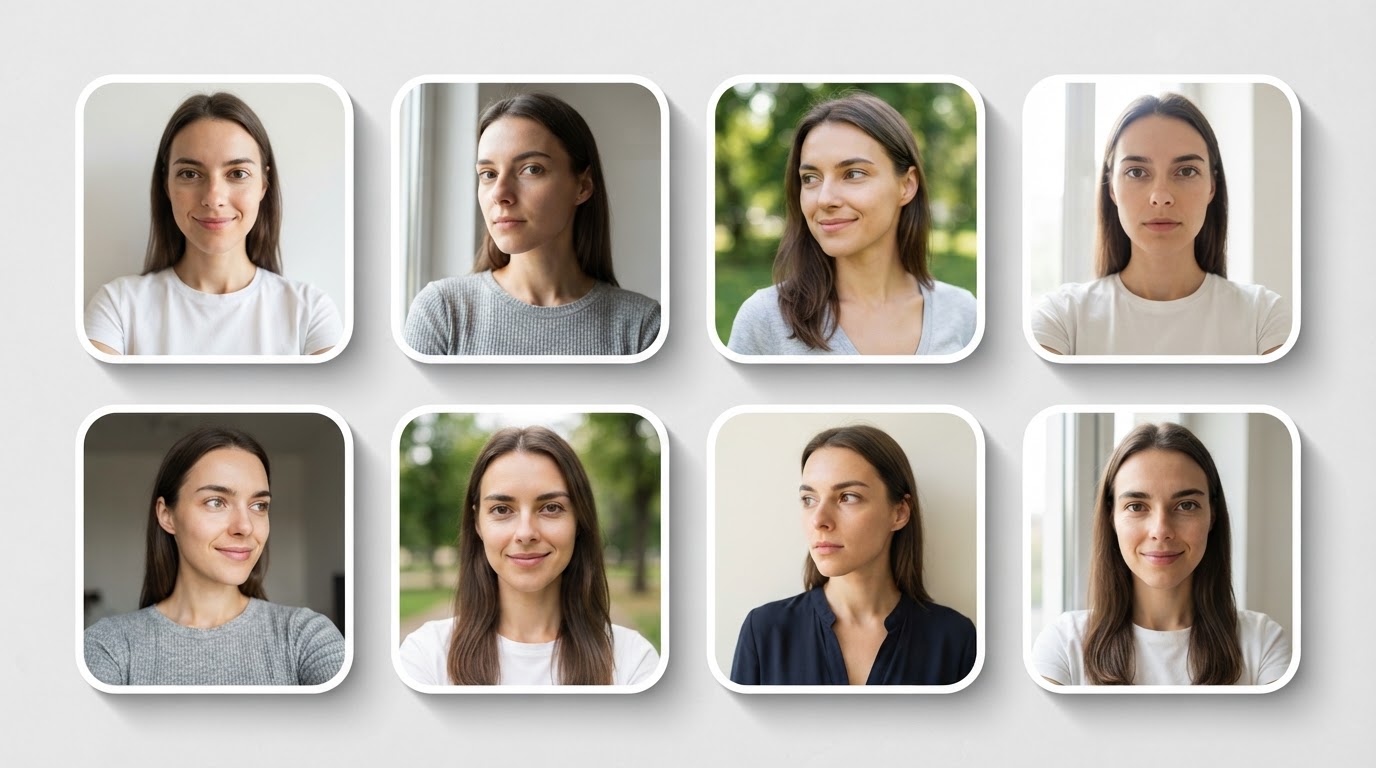
The quick checklist
Aim for at least ten photos. Magic Studio's team FAQ specifically recommends ten-plus pictures and says a diverse mix of outfits, locations and lighting conditions can improve results. Individual workflows may ask for a different count, so follow the live upload screen if it says otherwise.
| Include | Leave out |
|---|---|
| Recent images that show your normal hair and face | Photos from years ago |
| Front-facing and slight-angle shots | Extreme angles or face-obscuring poses |
| Clear light and visible eyes | Dark bars, night scenes and harsh backlight |
| Only you in the frame | Group photos and cropped wedding pictures |
| A few normal outfits | Sunglasses, heavy filters and novelty costumes |
It helps to collect the images in one folder first. Give yourself ten minutes with a cup of tea, make a clean selection and upload once. This is much better than pulling random pictures from a camera roll while the form is open.
What "variety" actually means
People sometimes hear "variety" and upload a completely different look in every photo. That makes the job harder. The useful kind of variety changes the camera angle, setting and light, while your core appearance stays the same.
For example, a good set could include a window-light selfie, a clear holiday photo, a casual dinner photo, a work photo and two outdoor images. In all of them, you should have broadly the same hairstyle, glasses and facial hair. The system then gets a fuller picture of your face rather than conflicting versions of it.
If you have changed your look recently, use the current version. Do not combine short-hair photos from last summer with today's longer hair and expect the AI to know which one belongs on LinkedIn.
Light makes a larger difference than a good camera
You do not need a DSLR or a ring light. A modern phone by a window is enough. Soft daylight shows the eyes, face shape and skin tone without creating harsh shadows. The official Magic Studio photo advice recommends avoiding direct sunlight and heavy overhead lights, which can cause strong shadows, shiny patches or squinting.
Stand facing a window rather than putting the window behind you. A plain wall is ideal, but any calm setting is fine. The background in the source picture does not need to become the final background; it only needs to let your face remain obvious.
Avoid these lighting traps:
- bright window behind you, leaving your face dark;
- midday sun creating deep eye shadows;
- nightclub, restaurant or car photos with coloured light;
- heavily edited social media images; and
- screenshots with compression or text over your face.
Frame your face properly
Your face should be the main subject, but do not crop so tightly that the system sees only eyes and nose. Mid-chest to head is a useful starting point. Keep the phone around eye level. Look at the lens in a few images and keep a relaxed, normal expression.
Magic Studio's professional-photo guidance suggests a camera at eye level, a little space above the head and a clean mid-chest crop. The same logic works for AI inputs: it gives the model a clear, proportionate view.
You can include a few images where you are looking slightly away, but do not make the whole collection dramatic. You are building data for a professional portrait, not an album cover.
Glasses, facial hair and other recognisable features
If you wear glasses at work, include them in most of your uploaded photos. If you only wear them occasionally, use a balanced mix and choose the final result that matches your real daily presentation. Clean lenses and a visible eye line help.
The same applies to facial hair, curls, protective hairstyles and jewellery. The system learns repeated visual signals. Give it clear, recent examples. If something important appears in only one dark photo, do not expect it to be perfectly reproduced.
There is no need to hide what makes you recognisable. A professional headshot should look like you, not a generic business avatar.
Clothes for your upload photos
Your input clothes do not have to be the final generated clothes, but neat, simple clothing helps keep the images clear. Wear solid colours or soft textures where possible. Loud patterns, large logos and novelty outfits draw attention away from your face and can make the source set harder to read.
This is not a demand to look formal at home. A plain T-shirt, shirt, knit or jacket can all work. The important thing is that you look like yourself on a normal good day.
Upload mistakes that quietly hurt results
Using only selfies
Selfies are useful, especially in soft daylight, but a set of identical arm's-length selfies offers limited information. Add a few photos taken by another person or from a slight distance.
Adding group crops
Even if you have cropped a friend out, their hair, arm or shoulder can still appear at the edge. Upload images where only you are clearly present.
Relying on one great old photo
One excellent image from five years ago is not a current source image. Choose recency over nostalgia.
Trying to look too serious
Relaxed beats stiff. A mild smile, level camera and dropped shoulders make better inputs than a forced "professional" expression.
Ignoring your current appearance
If you have new glasses, a different hairstyle or a changed beard, update the whole set. A consistent current group is more useful than mixing different eras.
A ten-photo starter set
If your camera roll feels overwhelming, use this practical template:
- Window-light selfie facing the camera.
- Window-light selfie turned slightly left.
- Window-light selfie turned slightly right.
- A casual upper-body photo taken by someone else.
- A clear outdoor photo in shade.
- A work or event photo where only you are visible.
- A different outfit in soft indoor light.
- A smiling shot.
- A neutral-expression shot.
- One more recent image that shows your everyday look well.
Review them as a grid. If they look like ten versions of the same current person, you have done the hard part right.
After you receive your AI headshots
The uploads influence quality, but the final selection still matters. Look closely at face shape, hairline, eyes, glasses, earrings and clothing. Then view the candidate at small size for LinkedIn or a website bio. The image should be easy to recognise and not feel overly polished.
Our guide to how Magic Studio works explains what happens after upload. If your goal is a profile refresh, our AI LinkedIn headshots guide helps you choose the right final crop and expression. Planning a group rollout? Start with AI headshots for teams.
FAQs
How many photos should I upload to Magic Studio?
Use at least ten clear, recent photos as a sensible target. Follow the live upload instructions if they ask for a different number.
Can I upload selfies?
Yes. Use clear selfies in soft light, then add a few photos from a little farther away or taken by another person for more useful variety.
Should I wear glasses in my input photos?
If you usually wear glasses professionally, include them in most of the set. Keep them clean and make sure your eyes are visible.
What photos should I never upload?
Avoid group photos, old pictures, dark images, heavy filters, sunglasses and pictures where your face is partly hidden.
Sources and editorial note
This guide draws on the photo-upload advice and team FAQ on the official Magic Studio teams page plus the provider's professional headshot guide, checked 20 July 2026. It is an educational page, so it intentionally has no coupon block.
Related guides
How Magic Studio Works From Upload to Final Photo
What happens to your photos after you press upload.
AI LinkedIn Headshots That Still Look Like You
Pick the final crop and expression that works in a feed.
AI Headshots for Teams Without the Photo-Day Chaos
Send this checklist with every team invite.